GPT Plus|AI 会员充值
一站开通 ChatGPT Plus / Pro、Grok、Cursor、Gemini 会员,支付宝付款,充到你自己的账号,服务费公开,30 天质保。
GPT SidePanel is a powerful browser extension that allows you to chat based on your webpage content. It provides features such as translation, summarization, rephrasing, and even product analysis. You can customize prompts according to your habits, helping you complete your workflow quickly.
Published and maintained by ToolsBot Editorial Team
| Product website | https://gptsidepanel.com/ |
|---|---|
| Category |
Dates refer to this ToolsBot listing, not the product’s launch date or a new independent review.
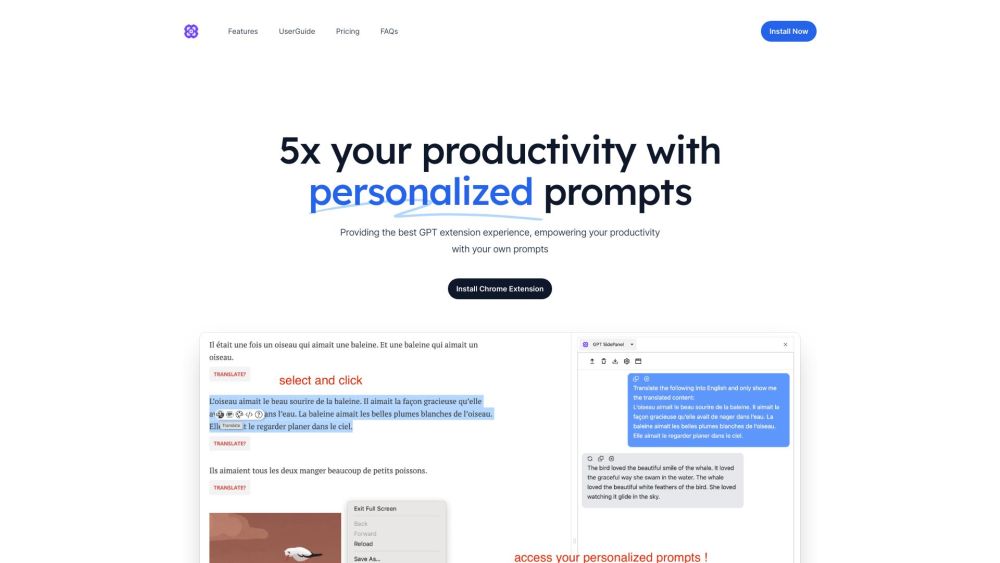
GPT SidePanel is a powerful browser extension that allows you to chat based on your webpage content. It provides features such as translation, summarization, rephrasing, and even product analysis. You can customize prompts according to your habits, helping you complete your workflow quickly.
To use GPT SidePanel, you need to install the browser extension from the Chrome Web Store. Once installed, you can open the SidePanel by pressing Alt+G (Option+G) or clicking on the extension icon. From there, you can customize prompts, explore the features, and interact with your webpage.
#1 Enhancing work efficiency #2 Product management #3 Tech reviewing #4 Language translation #5 Content summarization
Translation Summarization Rephrasing Product Analysis Customizable Prompts
Is GPT SidePanel free or do I need to pay for it? Do I have to sign up to use GPT SidePanel? Will you support more browsers? Will there be more features in the future? Who is GPT SidePanel useful for?
Tools in the same categories, ranked by shared categories and then total views. Compare their features to find a suitable alternative.
一站开通 ChatGPT Plus / Pro、Grok、Cursor、Gemini 会员,支付宝付款,充到你自己的账号,服务费公开,30 天质保。
A privacy-focused browser tool that strips invisible Unicode, zero-width spaces, and unwanted Markdown from AI output before you paste it in
AI-powered platform enhancing creativity for individuals and brands.
AI-powered financial tracking and insights platform for better decision making.
A voice-based quick-capture app for thoughts and ideas.
AI-driven platform for managing test cases and enhancing collaboration.
More tools to explore, ranked by total views on ToolsBot. Newer listings come first when view counts are equal.
Free online AI video generator: create cinematic text-to-video and image-to-video clips with native audio and lip sync using Seedance 2.5, K
ChatGPT Plus、Pro 5x、Pro 20x 会员充值,支付宝付款,充到你自己的账号,没有美金卡也能开通,30 天质保。
Create fictional desk-concert videos with original audio from authorized adult portraits. Choose a lead and up to four optional bandmates, t
SyncStudy helps students turn public YouTube playlists into structured courses. Organize video lessons, track your progress, take timestampe
FaceTiers is a free attractiveness test. An on-device face landmark model places 478 points on your photo inside the browser, so the image n
AI book cover generator for indie authors: turn your title, genre, and story summary into two distinct directions. Refine your favorite and
Product reference: GPT SidePanel — Product website.
Check the product website for current capabilities, pricing and policies before adopting this tool.
ToolsBot provides directory information for discovery and comparison. A listing is not an endorsement or a guarantee of product claims.