Dot Copilot
AI assistant for Android streamlining tasks and productivity.
Papper is an innovative iOS application designed to make your life organized and productive. It allows you to turn handwritten notes into digital to-do lists, create and print out your own checklists, scan your progress directly from these lists, and gives access to an extensive range of pre-made checklists on various subjects.
Publié et maintenu par Équipe éditoriale ToolsBot
| Site du produit | Papper |
|---|---|
| Catégorie |
Les dates concernent la fiche ToolsBot, et non le lancement du produit ou une nouvelle évaluation indépendante.
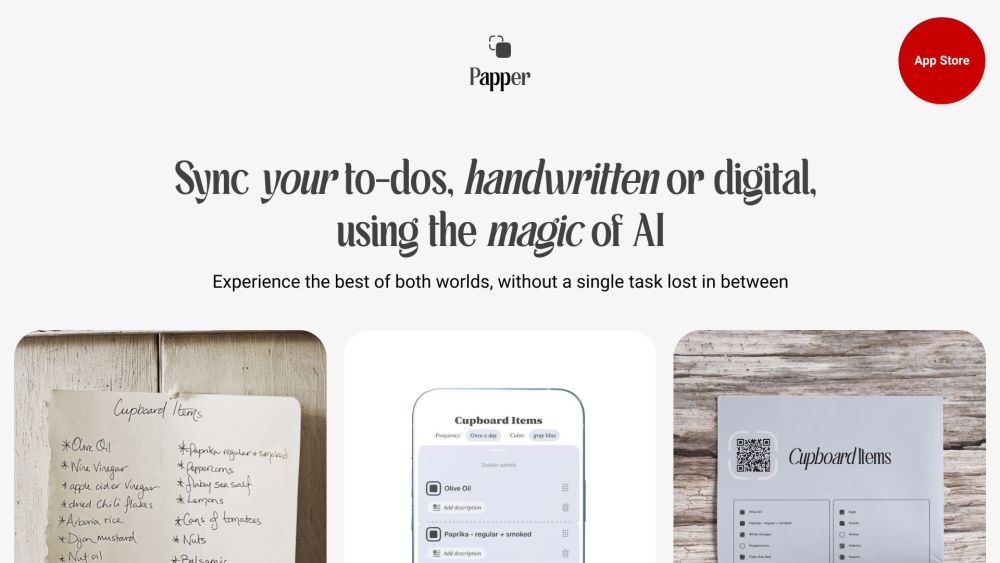
Papper is an innovative iOS application designed to make your life organized and productive. It allows you to turn handwritten notes into digital to-do lists, create and print out your own checklists, scan your progress directly from these lists, and gives access to an extensive range of pre-made checklists on various subjects.
To use Papper, simply download the app from the App Store and install it on your iOS device. Once installed, open the app and start creating your to-do lists by either handwriting them or adding digital tasks. You can also create and print out your own checklists. To sync your progress, scan your handwritten marks from the printable checklists. Papper will automatically update your task progress in the app.
#1 Papper can be used for various purposes such as personal task management, project planning, shopping lists, event organization, and more. Its versatile features make it suitable for individuals, professionals, and students.
Handwritten Recognition: snap a photo of your handwritten tasks, and Papper's AI will digitize them. Task Management: create and manage task lists directly in the app or sync it with Apple Reminders. Focused Design: focus better with Papper's design that promotes concentration on one task at a time. Checkers for Repetitive Tasks: stay on track with recurring tasks using Papper's checkers feature. Handmark Syncing: mark tasks on your printouts, and Papper will update your progress in the app. Stylish Printouts: transform your digital tasks into beautiful, distraction-free printouts with Papper.
What is Papper and what does it do? How does Papper convert handwritten notes into to-do lists? Can I update my tasks in Papper by scanning my handwritten marks? What kind of pre-made checklists are available in Papper? What devices is Papper compatible with? Is Papper free to use?
Outils des mêmes catégories, classés par catégories communes puis par nombre total de visites. Comparez leurs fonctions pour trouver une alternative adaptée.
AI assistant for Android streamlining tasks and productivity.
AI tool for converting handwritten text into digital documents instantly.
AI-driven platform for managing test cases and enhancing collaboration.
AI platform for tracking yearly resolutions and personal goals.
AI platform for B2B sales that automates and streamlines workflows.
All-in-one CRM to build, market, and scale your business.
Autres outils classés par nombre total de visites sur ToolsBot. À égalité, les fiches les plus récentes apparaissent en premier.
Un convertisseur audio-texte en ligne pour les fichiers MP3, M4A, WAV, MP4 et autres fichiers multimédias.
Styles récit de données, tableau blanc et présentation ; l’IA rédige le script, assure la narration, dessine et compose la musique d’un film
Parlez dans l’ordre qui vous vient, ou importez un mémo vocal, et obtenez des notes claires avec des titres, des listes à puces et une liste
Logiciel de répartition axé sur les SMS pour les entreprises de services sur le terrain exploitant 2 à 10 camions. Les techniciens n’install
Générateur gratuit de coloriages par IA qui transforme du texte ou des photos en coloriages imprimables, et des photos en portraits de style
Discutez avec des personnages d’IA et créez des histoires interactives. Créez des personnages fictifs personnalisés et explorez des jeux de
Référence du produit : Papper — Site du produit.
Consultez le site du produit pour vérifier ses fonctionnalités, tarifs et politiques actuels avant de l’adopter.
ToolsBot facilite la découverte et la comparaison. Une fiche ne constitue ni une approbation ni une garantie des affirmations du produit.