VidAU
VidAU AI empowers you to create videos simply through product links or descriptions, with realistic AI avatars as your engaging spokesperson
Elevate short-form videos to engaging stories with AI
Publié et maintenu par Équipe éditoriale ToolsBot
| Site du produit | ClipGlow |
|---|---|
| Catégorie |
Les dates concernent la fiche ToolsBot, et non le lancement du produit ou une nouvelle évaluation indépendante.
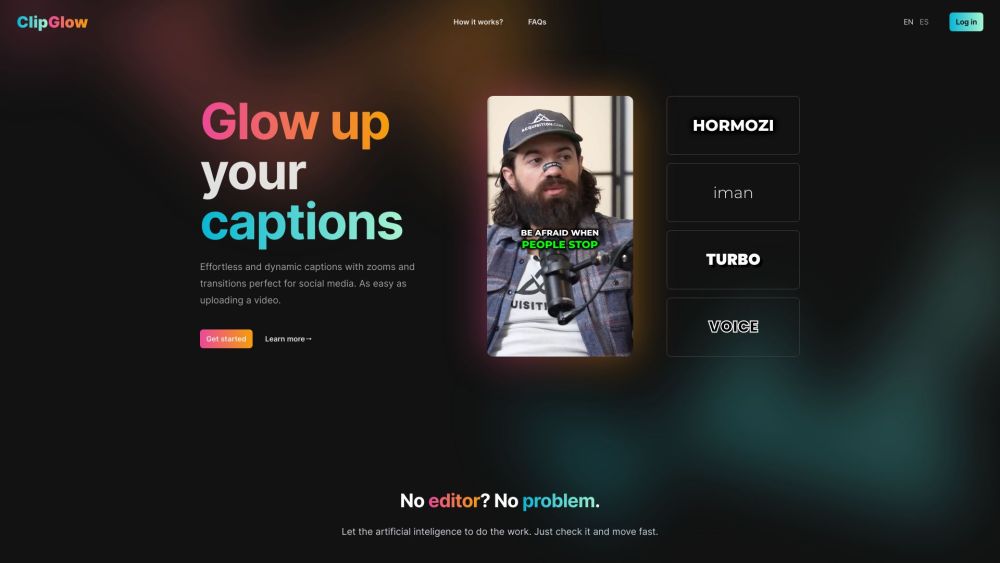
Elevate short-form videos to engaging stories with AI
Revitalize short-form videos with AI-powered editing. Easily transcribe audio to captions, add emojis, sound effects, and stylish transitions for professional, engaging social media content. Ideal for creators seeking an easy, professional touch.
#1 Creators seeking an easy, professional touch #2 Those looking to enhance their social media content #3 Anyone in need of accurate and engaging captions for their videos #4 Individuals wanting to add audio effects and transitions to their videos
AI generated captions Effortless and dynamic captions with zooms and transitions perfect for social media AI-Powered Transcription Automatic, multi-language speech-to-text conversion for accurate subtitles Interactive Editing Suite Easy-to-use editor for syncing and customizing captions Dynamic Caption Styles Various caption styles, animations, and effects to enhance videos One-Click Export Quick and easy export of enhanced videos in a single click Audio Effect Integration Add audio effects for impactful sound enhancements Emojis and Transitions Diverse emojis and smooth transitions to enliven video content (coming soon)
What types of video formats can I upload? How does the AI determine what captions to add? Can I customize the style of the captions? Is there a limit to the video length for captioning? How many languages do you support? Can I edit or delete captions after they have been generated? How can I reach customer support if I need assistance? What is the turnaround time for AI captioning and video enhancement? How do I get started with your service?
Outils des mêmes catégories, classés par catégories communes puis par nombre total de visites. Comparez leurs fonctions pour trouver une alternative adaptée.
VidAU AI empowers you to create videos simply through product links or descriptions, with realistic AI avatars as your engaging spokesperson
OpusClip Captions is a free AI tool that adds animated captions to videos in 1 click.
VideoTube is free AI video generator that turns text and images into videos within minutes.
AI tool for turning long videos into short clips.
An AI tool that transforms scripts into short-form videos optimized for social media platforms like TikTok, IG Reels, and YouTube Shorts.
AIVideo is a platform that combines various video production tools within a chatbot to generate scripts, voiceovers, visuals, animation, vid
Autres outils classés par nombre total de visites sur ToolsBot. À égalité, les fiches les plus récentes apparaissent en premier.
Enregistrez votre écran dans le navigateur, coupez la vidéo en modifiant sa transcription et partagez un lien que les personnes peuvent ouvr
Linger est une application Mac privilégiant le stockage local pour collecter et comparer des références de design. Enregistrez des images av
Convertissez des photos, des documents numérisés et des captures d’écran en texte modifiable, sans importer vos images ni vous inscrire.
Importez une photo, une affiche ou un panneau, saisissez le texte souhaité et récupérez la même image avec un nouveau texte adapté au style
Appuyez sur Démarrer et parlez : chaque phrase apparaît dans votre document environ une seconde après que vous l’avez prononcée, avec la pon
FindLeadEmails trouve des adresses e-mail professionnelles à partir du nom d’une personne et du domaine d’une entreprise. Il vérifie chaque
Référence du produit : ClipGlow — Site du produit.
Consultez le site du produit pour vérifier ses fonctionnalités, tarifs et politiques actuels avant de l’adopter.
ToolsBot facilite la découverte et la comparaison. Une fiche ne constitue ni une approbation ni une garantie des affirmations du produit.