Airender
스케치와 모델 스크린샷으로 건축 콘셉트 렌더링을 생성하고, 브라우저 기반 Studio에서 부분 편집, 이미지 향상 및 버전 관리를 할 수 있습니다.
AI home, kitchen, and landscape design visualizer: upload a room or yard photo and preview paint, cabinetry, landscaping, and lighting while Structure Lock keeps real walls and windows fixed.
게시 및 관리: ToolsBot 편집팀
| 제품 웹사이트 | PlanRemodel |
|---|---|
| 범주 | |
| ToolsBot 등록일 | |
| 등록 정보 수정일 |
날짜는 ToolsBot 등록 기록에 관한 것으로, 제품 출시일이나 새로운 독립 평가일을 의미하지 않습니다.
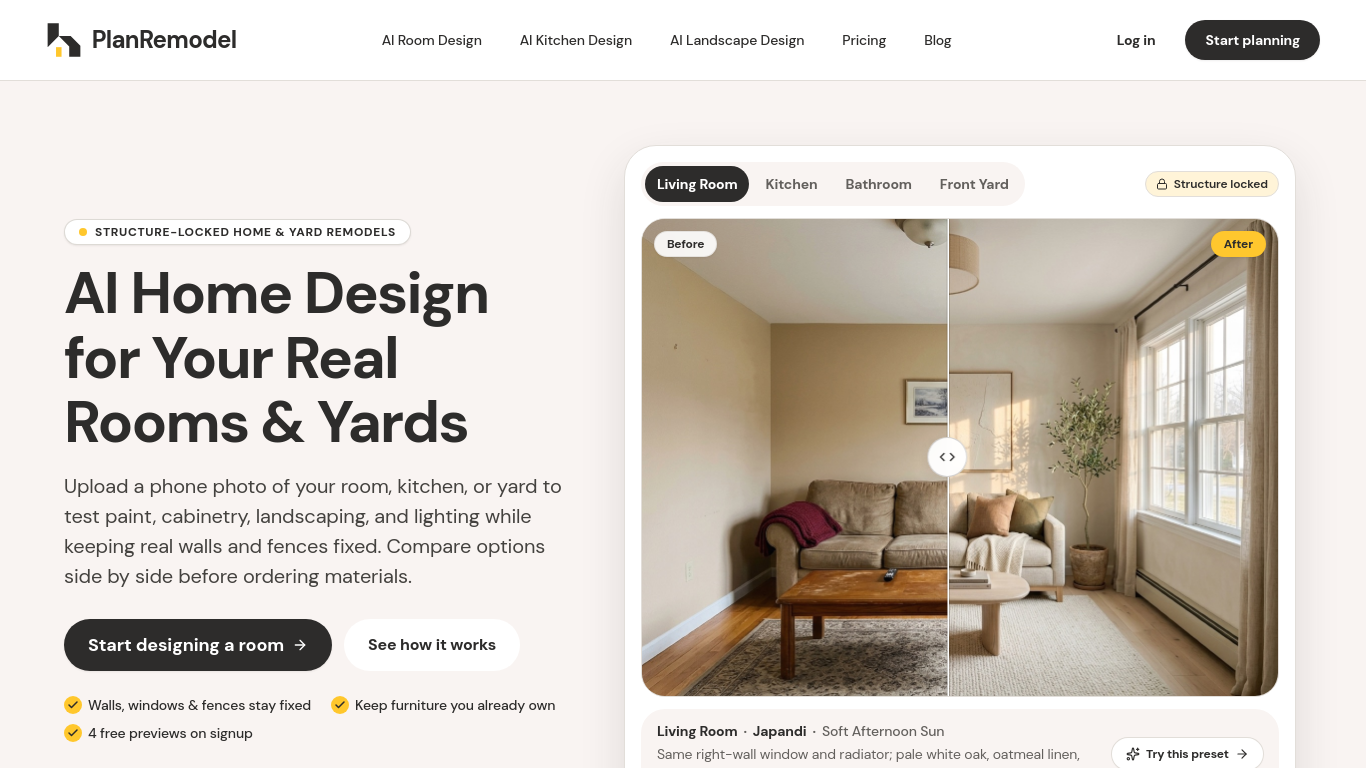
PlanRemodel is a web-based AI home, kitchen, and landscape design visualizer for homeowners and renters. Upload an eye-level smartphone photo of a room, kitchen, or yard to test ideas before spending money on a remodel.
Upload an eye-level photo or describe a space, then select styles, lighting, and design options to generate and compare previews.
Homeowners and renters can compare paint, cabinetry, furnishings, lighting, and landscaping ideas before buying materials or starting a remodel.
Structure Lock keeps walls, windows, plumbing, and fences fixed; 12 interior styles; 6 lighting moods; keep existing furniture; compare up to 4 looks side by side; 4 free previews per account, optional Pro plan and credit packs.
Q: Can I use PlanRemodel without a photo? A: Yes. Text to Design lets you describe a space. Q: Does it accept floor plans? A: No. It uses eye-level photos or written descriptions. Q: Are the previews construction documents? A: No. They are visual references; details should be verified with a licensed professional.
같은 카테고리의 도구를 공통 카테고리 수, 누적 조회수 순으로 표시합니다. 기능을 비교하여 적합한 대안을 찾아보세요.
스케치와 모델 스크린샷으로 건축 콘셉트 렌더링을 생성하고, 브라우저 기반 Studio에서 부분 편집, 이미지 향상 및 버전 관리를 할 수 있습니다.
부동산 사진을 위한 AI 가상 홈 스테이징 및 가구 제거 서비스입니다. 생성된 이미지를 원본과 비교하고 최종 매물 사진을 선택할 수 있습니다. 워터
무료 욕실 리모델링 및 데크 비용 계산기입니다. 규모, 공사 범위, 등급에 따른 계획용 예상 비용 범위를 자재비와 인건비의 항목별 내역, 주별 조정,
RoomFloat는 AI를 사용해 방 사진으로 인테리어 디자인 미리보기를 생성하여 사용자가 스타일을 살펴보고 방 리디자인을 비교할 수 있도록 돕습니다.
Floor Plan AI는 방 목록, 대지 크기 또는 대략적인 스케치를 2D, 2.5D 또는 3D 평면도 콘셉트로 변환합니다.
건물, 인테리어 및 풍경을 위한 GetRender의 AI 건축 렌더링 도구를 스케치에서 렌더링까지 디자인 프레젠테이션까지 탐색하십시오.
ToolsBot 누적 조회수순으로 정렬한 다른 도구입니다. 조회수가 같으면 최근 등록된 도구를 먼저 표시합니다.
Yinzi AI is a free online vocal remover. Upload a song to separate vocals and accompaniment with AI, make karaoke backing tracks, or split d
FanYue AI is a desktop app for macOS and Windows that turns Cantonese and other speech from system audio or the microphone into live Chinese
UnTagVideo is an online AI video watermark remover for your own footage. Upload MP4, MOV or WebM, let AI detect and repair the watermark are
DeleteText is a free AI image text remover. Upload a JPG, PNG or WebP (up to 20MB), brush over unwanted lettering, and AI rebuilds the backg
SpeedTranscript turns a voice recording into an editable transcript with timestamps and speaker labels. Upload a voice memo, meeting recordi
Identify This Plant is a free AI plant identifier. Upload a JPG, PNG or WebP photo of a flower, tree, houseplant, succulent or weed to see l
제품 참고 링크: PlanRemodel — 제품 웹사이트.
도입 전에 제품 웹사이트에서 최신 기능, 가격 및 정책을 확인하세요.
ToolsBot은 제품 탐색과 비교를 위한 정보를 제공합니다. 등록이 제품에 대한 보증이나 주장의 정확성을 보장하지는 않습니다.