Signlz
Signlz is an AI-powered PRD generator designed for product professionals. It creates requirement documents and technical specifications, and
Korl syncs and summarizes product roadmap data in a single place, then auto-generates consumable product presentations, each tailored for a specific use case and audience.
Veröffentlicht und gepflegt von ToolsBot-Redaktion
| Produktwebsite | Korl |
|---|---|
| Kategorie |
Die Daten beziehen sich auf den ToolsBot-Eintrag, nicht auf den Produktstart oder eine neue unabhängige Prüfung.
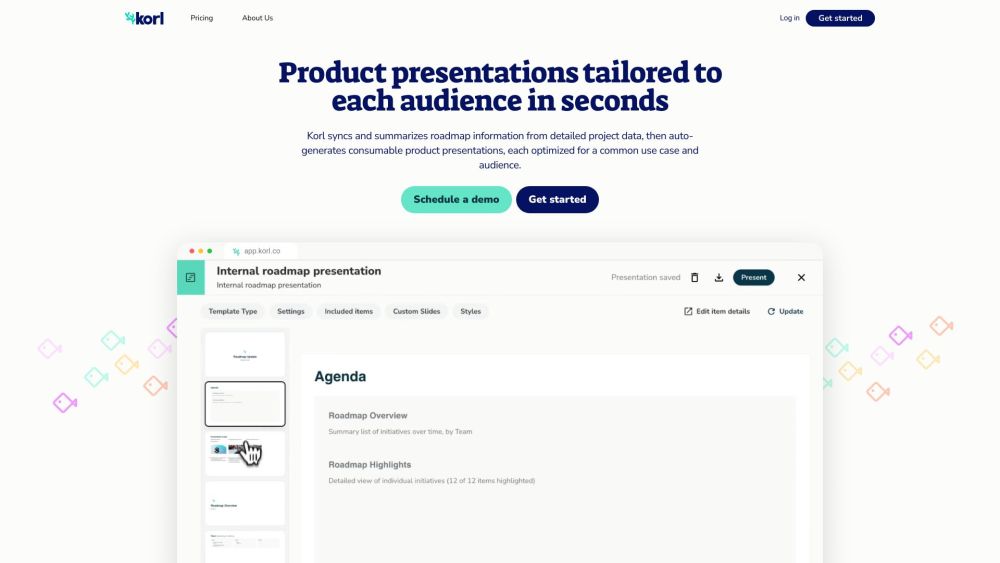
Korl syncs and summarizes product roadmap data in a single place, then auto-generates consumable product presentations, each tailored for a specific use case and audience.
Korl integrates with tools like Jira and your PRDs to sync data and auto-generate content about items on the roadmap. Users can create and customize slides from best practice templates, communicate and collaborate from a shared source of truth, and invite project owners and stakeholders to review and provide feedback on presentations.
#1 { "use_case": "Customer Meetings", "description": "Share the product direction with a customer using the External Roadmap template. It includes an introduction to notable investment themes, an externally-facing detail slide per feature, and a summary view of items organized by configurable time periods." } #2 { "use_case": "Company All Hands", "description": "Update the company on product plans with the Internal Roadmap template. It covers high-level takeaways upfront, a summary list of projects organized by key concepts (such as Priority, Goal, or Team), and the option to highlight any individual item with an internally-facing detail slide." } #3 { "use_case": "GTM Enablement", "description": "Enable GTM teams to sell and support key changes with the Release Review template. For a given release, it details what changes are included, how they align to different themes and user personas, and how they should be positioned externally." } #4 { "use_case": "Executive Updates", "description": "Keep leadership informed about product progress with the Status Update template. It provides visibility into important overall takeaways and progress metrics, the list of roadmap items added or removed since the last planning milestone, and whether any highly strategic projects are at risk." }
The core features of Korl include syncing and summarizing roadmap information, auto-generating product presentations, integrating with tools like Jira and PRDs, customizable templates, collaborative review and feedback, and a repository of past presentations.
Which tools can Korl integrate with? Can I customize the templates in Korl? How can I collaborate with others on presentations? Is there a free trial available for Korl?
Tools aus denselben Kategorien, sortiert nach gemeinsamen Kategorien und dann nach Gesamtaufrufen. Vergleiche die Funktionen, um eine passende Alternative zu finden.
Signlz is an AI-powered PRD generator designed for product professionals. It creates requirement documents and technical specifications, and
Walling is the new medium for organizing work & presenting ideas. Simply ask Walling AI what you want to organize or present, and watch it b
Watto AI is an artificial intelligence-powered platform that seamlessly integrates information from multiple platforms and generates documen
AI platform for tracking yearly resolutions and personal goals.
AI-driven platform for smarter and faster project management.
AI knowledge system for building and automating businesses.
Weitere Tools nach Gesamtaufrufen auf ToolsBot. Bei gleicher Aufrufzahl erscheinen neuere Einträge zuerst.
KI-Kreativstudio für die Erstellung von Bildern, Videos, Musik und Sprachaufnahmen – alles an einem Ort.
Magi2AI ist eine unabhängige Webanwendung, die Sand.ai MAGI-2 nutzt, um filmreife KI-Videos in 1080p mit nativ synchronisiertem Audio aus Te
Verbinden Sie ChatGPT, Claude und Entwickler-Clients über SiftingIO MCP-Tools mit Echtzeit- und historischen Marktdaten für US-Aktien, Devis
KI-Generator für Videos ohne Gesicht: Verwandle jedes Thema in wenigen Minuten in ein vertontes und untertiteltes Kurzvideo für YouTube Shor
Entdecken Sie Pflanzideen anhand von Gartenfotos: benannte Bereiche, Pflanzenvorschläge, Verfeinerungen von Bereichen und eine teilbare Über
KI-Buchcoverdesign für unabhängige Autorinnen und Autoren. Generiere genreorientierte Illustrationen, bearbeite die Typografie und bereite E
Produktreferenz: Korl — Produktwebsite.
Prüfe aktuelle Funktionen, Preise und Richtlinien auf der Produktwebsite, bevor du das Tool einsetzt.
ToolsBot hilft bei der Suche und beim Vergleich. Ein Eintrag ist keine Empfehlung oder Garantie für Produktangaben.