ConvoSearch
AI search engine for enhancing eCommerce sales and customer experience.
HelpBar enables users to search help resources, navigate your product, and launch other “actions” from within your product, helping them get answers and achieve success quickly.
Publié et maintenu par Équipe éditoriale ToolsBot
| Site du produit | HelpBar |
|---|---|
| Catégorie |
Les dates concernent la fiche ToolsBot, et non le lancement du produit ou une nouvelle évaluation indépendante.
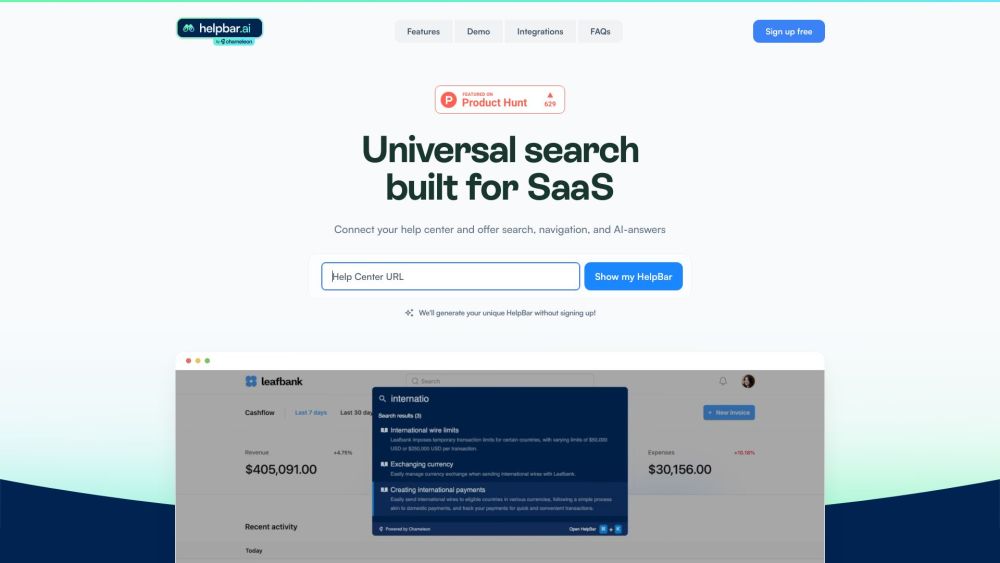
HelpBar enables users to search help resources, navigate your product, and launch other “actions” from within your product, helping them get answers and achieve success quickly.
Connect your help center and set your brand styles. Build a trigger widget or set a keyboard shortcut. Choose pinned “always there” items and go live!
#1 Let users find exactly what they need without going to another tab—AI answers draw responses from all the content you input for a speedy search. #2 HelpBar makes navigating your app a breeze. Enable users to learn fast and speed through the work they need to get done. #3 Give your CS team time back for proactive support. With HelpBar, users can find the help they need with a Command + K. #4 Keep users in your app while using their favorite tools. Launch Loom videos, showcase interactive demos, share Figma prototypes and more.
Universal search built for SaaS Connect your help center and offer search, navigation, and AI-answers Speed up time to value Create power users Reduce support costs Surface the rest of your stack
How does HelpBar work? What can HelpBar do for my users? How can HelpBar benefit my customer support team? How can HelpBar integrate with other tools? What do customers say about HelpBar?
Outils des mêmes catégories, classés par catégories communes puis par nombre total de visites. Comparez leurs fonctions pour trouver une alternative adaptée.
AI search engine for enhancing eCommerce sales and customer experience.
Faircado is the first AI-powered browser extension that helps you find the best second-hand alternatives to products you’re searching for on
Ayraa is a personal search engine and knowledge assistant designed for the workplace. It connects with Slack and your web browser to capture
OpenBuckets uses AI-powered algorithms to swiftly identify exposed buckets using simple search queries.
Overwatch Data is a no-code, AI-driven platform that goes beyond Google Alerts and keyword tools. It provides tailored news and social insig
Domainchamp is a platform that helps users discover the best expiring domains. It scans thousands of domain auctions daily and selects the t
Autres outils classés par nombre total de visites sur ToolsBot. À égalité, les fiches les plus récentes apparaissent en premier.
TaxBowl met à la disposition des startups et des petites entreprises une équipe réactive unique pour la tenue comptable, la comptabilité, l’
Générez de courtes vidéos en 1080p avec un son synchronisé à partir de prompts, d’images ou de médias de référence. Inscrivez-vous pour accé
Glasshand est un espace de travail visible et vérifiable pour les agents IA qui effectuent des tâches à l’écran. Confiez-leur une tâche, obs
Une interface pour LLM destinée aux utilisateurs expérimentés qui souhaitent contrôler en profondeur les personnages, les prompts et les mod
HappyShrimp est une plateforme musicale tout-en-un basée sur l’IA. Transformez une phrase en une chanson complète - paroles, voix et product
AI直充 propose un service de rechargement d’abonnement GPT 5.6 pour le compte des utilisateurs, avec paiement via WeChat Pay, suivi des comm
Référence du produit : HelpBar — Site du produit.
Consultez le site du produit pour vérifier ses fonctionnalités, tarifs et politiques actuels avant de l’adopter.
ToolsBot facilite la découverte et la comparaison. Une fiche ne constitue ni une approbation ni une garantie des affirmations du produit.