ConvoSearch
AI search engine for enhancing eCommerce sales and customer experience.
HelpBar enables users to search help resources, navigate your product, and launch other “actions” from within your product, helping them get answers and achieve success quickly.
Publicado e mantido por Equipe editorial do ToolsBot
| Site do produto | HelpBar |
|---|---|
| Categoria |
As datas se referem ao registro no ToolsBot, não ao lançamento do produto nem a uma nova avaliação independente.
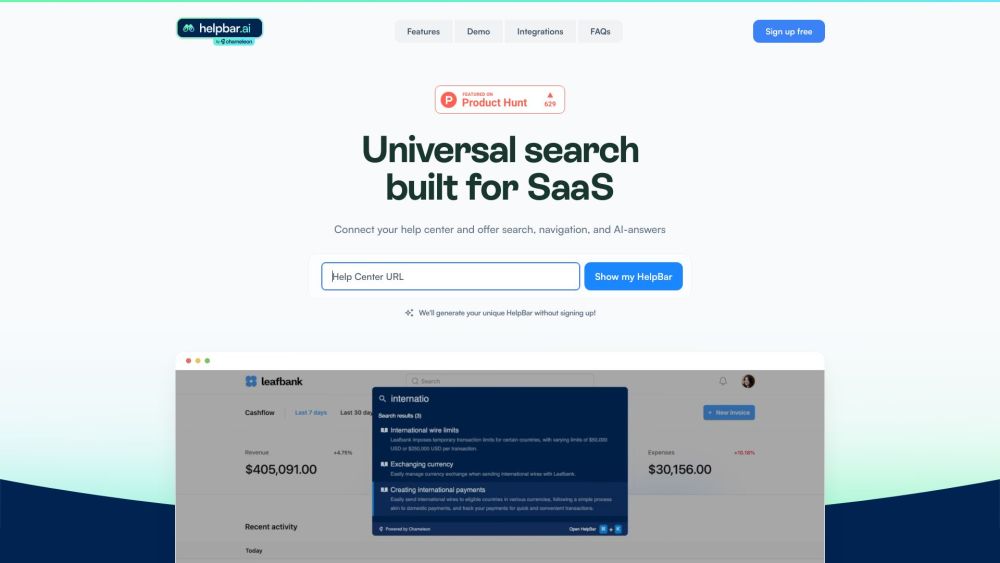
HelpBar enables users to search help resources, navigate your product, and launch other “actions” from within your product, helping them get answers and achieve success quickly.
Connect your help center and set your brand styles. Build a trigger widget or set a keyboard shortcut. Choose pinned “always there” items and go live!
#1 Let users find exactly what they need without going to another tab—AI answers draw responses from all the content you input for a speedy search. #2 HelpBar makes navigating your app a breeze. Enable users to learn fast and speed through the work they need to get done. #3 Give your CS team time back for proactive support. With HelpBar, users can find the help they need with a Command + K. #4 Keep users in your app while using their favorite tools. Launch Loom videos, showcase interactive demos, share Figma prototypes and more.
Universal search built for SaaS Connect your help center and offer search, navigation, and AI-answers Speed up time to value Create power users Reduce support costs Surface the rest of your stack
How does HelpBar work? What can HelpBar do for my users? How can HelpBar benefit my customer support team? How can HelpBar integrate with other tools? What do customers say about HelpBar?
Ferramentas das mesmas categorias, ordenadas por categorias em comum e depois pelo total de visualizações. Compare os recursos para encontrar uma alternativa adequada.
AI search engine for enhancing eCommerce sales and customer experience.
Faircado is the first AI-powered browser extension that helps you find the best second-hand alternatives to products you’re searching for on
Ayraa is a personal search engine and knowledge assistant designed for the workplace. It connects with Slack and your web browser to capture
OpenBuckets uses AI-powered algorithms to swiftly identify exposed buckets using simple search queries.
Overwatch Data is a no-code, AI-driven platform that goes beyond Google Alerts and keyword tools. It provides tailored news and social insig
Domainchamp is a platform that helps users discover the best expiring domains. It scans thousands of domain auctions daily and selects the t
Mais ferramentas ordenadas pelo total de visualizações no ToolsBot. Em caso de empate, os registros mais recentes aparecem primeiro.
A TaxBowl oferece a startups e pequenas empresas uma equipa ágil para contabilidade, escrituração contabilística, apoio ao processamento sal
Gere vídeos curtos em 1080p com áudio sincronizado a partir de prompts, imagens ou mídias de referência. Crie uma conta para acessar o estúd
O Glasshand é um espaço de trabalho visível e auditável para agentes de IA que executam tarefas no ecrã. Delegue a tarefa, acompanhe o próxi
Uma interface para LLM destinada a utilizadores avançados que pretendem um controlo aprofundado sobre personagens, prompts e modelos locais.
HappyShrimp é uma plataforma completa de música com IA. Transforme uma frase em uma música completa - com letra, voz e produção incluídas.
AI直充 oferece um serviço de recarga de assinaturas do GPT 5.6, com pagamento pelo WeChat, consulta de pedidos e reembolso em caso de falha.
Referência do produto: HelpBar — Site do produto.
Confira os recursos, preços e políticas atuais no site do produto antes de utilizá-lo.
O ToolsBot fornece informações para descoberta e comparação. Uma listagem não é um endosso nem uma garantia das alegações do produto.