ConvoSearch
AI search engine for enhancing eCommerce sales and customer experience.
HelpBar enables users to search help resources, navigate your product, and launch other “actions” from within your product, helping them get answers and achieve success quickly.
게시 및 관리: ToolsBot 편집팀
| 제품 웹사이트 | HelpBar |
|---|---|
| 범주 |
날짜는 ToolsBot 등록 기록에 관한 것으로, 제품 출시일이나 새로운 독립 평가일을 의미하지 않습니다.
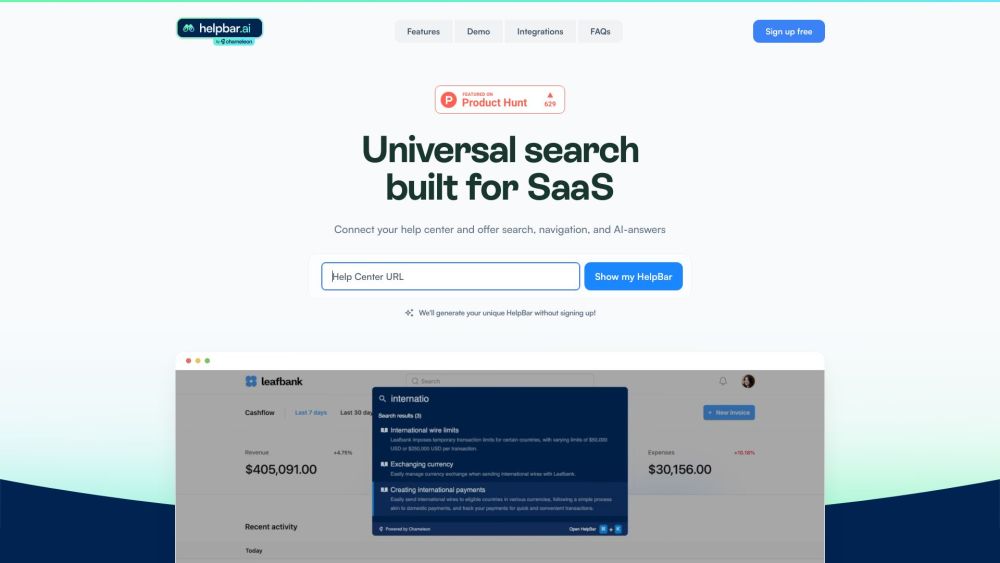
HelpBar enables users to search help resources, navigate your product, and launch other “actions” from within your product, helping them get answers and achieve success quickly.
Connect your help center and set your brand styles. Build a trigger widget or set a keyboard shortcut. Choose pinned “always there” items and go live!
#1 Let users find exactly what they need without going to another tab—AI answers draw responses from all the content you input for a speedy search. #2 HelpBar makes navigating your app a breeze. Enable users to learn fast and speed through the work they need to get done. #3 Give your CS team time back for proactive support. With HelpBar, users can find the help they need with a Command + K. #4 Keep users in your app while using their favorite tools. Launch Loom videos, showcase interactive demos, share Figma prototypes and more.
Universal search built for SaaS Connect your help center and offer search, navigation, and AI-answers Speed up time to value Create power users Reduce support costs Surface the rest of your stack
How does HelpBar work? What can HelpBar do for my users? How can HelpBar benefit my customer support team? How can HelpBar integrate with other tools? What do customers say about HelpBar?
같은 카테고리의 도구를 공통 카테고리 수, 누적 조회수 순으로 표시합니다. 기능을 비교하여 적합한 대안을 찾아보세요.
AI search engine for enhancing eCommerce sales and customer experience.
Faircado is the first AI-powered browser extension that helps you find the best second-hand alternatives to products you’re searching for on
Ayraa is a personal search engine and knowledge assistant designed for the workplace. It connects with Slack and your web browser to capture
OpenBuckets uses AI-powered algorithms to swiftly identify exposed buckets using simple search queries.
Overwatch Data is a no-code, AI-driven platform that goes beyond Google Alerts and keyword tools. It provides tailored news and social insig
Domainchamp is a platform that helps users discover the best expiring domains. It scans thousands of domain auctions daily and selects the t
ToolsBot 누적 조회수순으로 정렬한 다른 도구입니다. 조회수가 같으면 최근 등록된 도구를 먼저 표시합니다.
무료 온라인 리캡 영상 제작: 사진을 추가하고 템플릿을 선택한 다음 비트에 맞춰 편집된 MP4를 다운로드하세요. 앱 설치와 회원가입이 필요 없습니다
Telegram에서 사진을 애니메이션, 수채화, 3D 아바타 등 다양한 창작 스타일로 변환하세요. 맞춤형 사진 인사 카드도 만들 수 있습니다. 신규 계정에
제품 업데이트를 채널에 바로 활용할 수 있는 마케팅 문구와 시각 자료로 전환하세요.
AI 에이전트를 위한 LinkedIn MCP.
의류 판매자를 위한 AI 제품 사진: 의류 사진으로 모델 착용 이미지, 고스트 마네킹 이미지, 플랫레이 이미지를 만들거나 배경을 제거하세요.
AI Photo Detector는 사진이 AI로 생성되었거나 편집되었는지 확인합니다. 분류 결과, 신뢰도 및 제공되는 영역 분석을 확인할 수 있습니다. 영어와
제품 참고 링크: HelpBar — 제품 웹사이트.
도입 전에 제품 웹사이트에서 최신 기능, 가격 및 정책을 확인하세요.
ToolsBot은 제품 탐색과 비교를 위한 정보를 제공합니다. 등록이 제품에 대한 보증이나 주장의 정확성을 보장하지는 않습니다.