AI Photo Studio
Transform photos into anime, watercolor, 3D avatars and other creative styles inside Telegram. Make personalized photo greeting cards. New a
Free online recap video maker: add your photos, pick a template, download a beat-synced MP4. No app, no sign-up. Photos deleted after your video is made.
게시 및 관리: ToolsBot 편집팀
| 제품 웹사이트 | RecapTemplate |
|---|---|
| 범주 | |
| ToolsBot 등록일 | |
| 등록 정보 수정일 |
날짜는 ToolsBot 등록 기록에 관한 것으로, 제품 출시일이나 새로운 독립 평가일을 의미하지 않습니다.
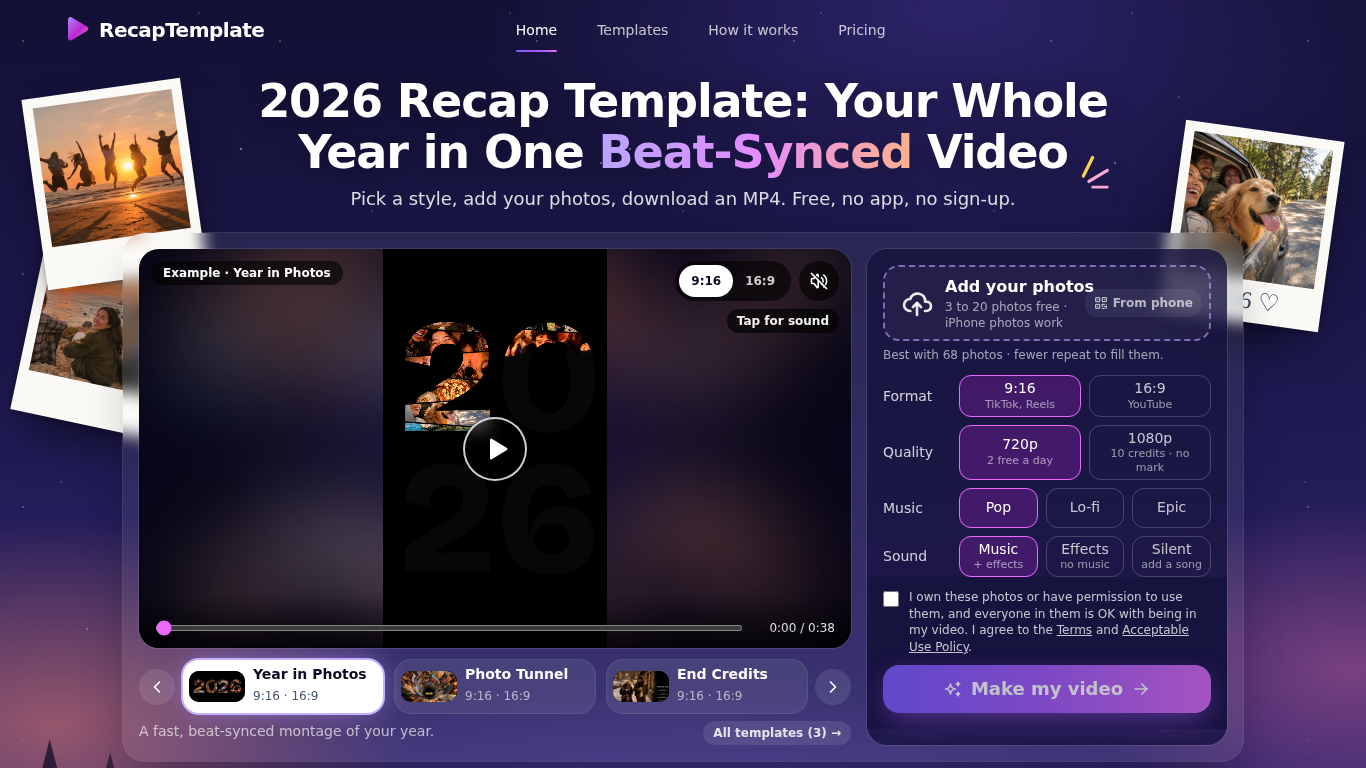
RecapTemplate turns your photos into a beat-synced recap video in the browser. Three templates (Year in Photos, Photo Tunnel, End Credits), 9:16 and 16:9, music Pop / Lo-fi / Epic. Free: up to 20 photos, 2 videos per day at 720p with a small watermark. Photos are uploaded to our servers and deleted when the video is made.
Choose a template and format, add photos, select sound options, and make the video in a browser.
Create year-in-review videos for TikTok, Reels, or YouTube.
Beat-synced recap videos, 3 templates, 9:16 and 16:9, MP4 download, no sign-up
Q: How many photos can I use? A: Three to 20 for free, or up to 120 for a 1080p video with credits. Q: What happens to my photos? A: The site says they are deleted once the video is made.
같은 카테고리의 도구를 공통 카테고리 수, 누적 조회수 순으로 표시합니다. 기능을 비교하여 적합한 대안을 찾아보세요.
Transform photos into anime, watercolor, 3D avatars and other creative styles inside Telegram. Make personalized photo greeting cards. New a
Image Text Eraser는 사진과 스크린샷에서 보이는 텍스트를 제거하고 배경을 복원합니다. 조건을 충족하는 인증된 계정에는 체험용 크레딧 30개가 제
RemoveText는 사진에서 보이는 글자를 지우고 가려진 배경을 복원합니다. JPG, PNG 또는 WebP 이미지를 한 번에 최대 10개까지 업로드할 수 있습니다.
사진을 업로드하고 감량하거나 증량할 파운드 수를 선택하면, AI가 나의 모습을 유지한 사실적인 전신 전후 이미지를 보여줍니다. 첫 미리보기는 무료
셀카를 업로드하고 약 20초 만에 내 얼굴에 112가지 헤어스타일 또는 36가지 헤어 컬러를 적용해 본 다음, 사진을 헤어 디자이너에게 보여주세요. 앱
Ravana is an AI face swap bot for photos and videos in Telegram. New users get free credits. Use Multi-Face, batch swaps, Enhanced quality a
ToolsBot 누적 조회수순으로 정렬한 다른 도구입니다. 조회수가 같으면 최근 등록된 도구를 먼저 표시합니다.
Turn product updates into channel-ready marketing copy and visuals.
The LinkedIn MCP for AI agents.
AI product photography for clothing sellers: create on-model, ghost mannequin and flat lay images from garment photos, or remove backgrounds
AI Photo Detector checks photos for AI generation and editing. View classification, confidence and available region analysis. English and Ch
AI Pose Gallery는 아티스트를 위한 포즈 레퍼런스 사이트입니다. 무료 포즈 스터디 라이브러리를 둘러보고 다운로드하거나, 사진과 레퍼런스 포즈를
Barz Studio는 오디오를 비트에 반응하는 랩 가사 영상으로 바꿔줍니다. 가사 타이밍을 맞추고 분위기를 선택한 뒤 9:16 WebM으로 내보내세요. 계정
제품 참고 링크: RecapTemplate — 제품 웹사이트.
도입 전에 제품 웹사이트에서 최신 기능, 가격 및 정책을 확인하세요.
ToolsBot은 제품 탐색과 비교를 위한 정보를 제공합니다. 등록이 제품에 대한 보증이나 주장의 정확성을 보장하지는 않습니다.