VidAU
VidAU AI empowers you to create videos simply through product links or descriptions, with realistic AI avatars as your engaging spokesperson
VideoPlus Studio is a free subtitle editor and translator that allows you to add subtitles to videos, edit and translate them to other languages. The distinguishing feature of VideoPlus Studio is that for every subtitle you can select a presenter, who has properties for turning the text into speeches in a certain language and voice, spoken by an avatar of your choice.
Published and maintained by ToolsBot Editorial Team
| Product website | VideoPlus Studio |
|---|---|
| Category |
Dates refer to this ToolsBot listing, not the product’s launch date or a new independent review.
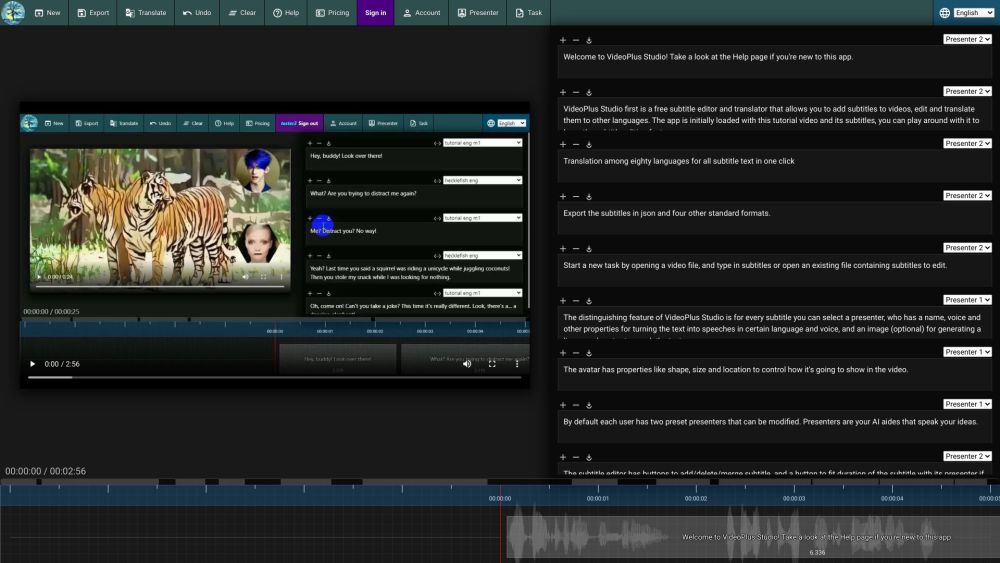
VideoPlus Studio is a free subtitle editor and translator that allows you to add subtitles to videos, edit and translate them to other languages. The distinguishing feature of VideoPlus Studio is that for every subtitle you can select a presenter, who has properties for turning the text into speeches in a certain language and voice, spoken by an avatar of your choice.
Start a new task by opening a video or subtitle file. Save subtitles to a local file. Export subtitles in json and other standard formats. Translate subtitles into another language. Undo the last change or clear all subtitles. View pricing and subscribe to a paid plan. Sign in to view/edit account info. View/Edit presenters. Submit current task to process and view task history.
#1 Create engaging videos with dynamic avatars. #2 Translate subtitles to reach a wider audience. #3 Enhance videos with visually appealing subtitles. #4 Generate lip-synced avatars to speak subtitles.
Free subtitle editor and translator. Add and edit subtitles for videos. Translation among 80 languages in one click. Export subtitles in json and four other standard formats. Select a presenter for each subtitle. Avatars with lip-synced speech based on text. Customizable avatar properties: shape, size, location. Modify preset presenters. Fit subtitle duration with presenter. Play video and see text moving along with the timeline. Submit tasks for processing and view task history.
What languages does VideoPlus Studio support for translation? Can I export the subtitles in json format? How do I add subtitles to a video? Can I modify the properties of the presenters? How can I fit the duration of a subtitle with its presenter? How can I submit a task for processing?
Tools in the same categories, ranked by shared categories and then total views. Compare their features to find a suitable alternative.
VidAU AI empowers you to create videos simply through product links or descriptions, with realistic AI avatars as your engaging spokesperson
AI-powered platform for interactive video hosting and marketing.
The most brilliant AI dubbing system
A platform to summarize and save videos from TikTok, Reels, and Shorts
Be a virtual YouTuber with NO expensive devices!
Automatisez la traduction de vos vidéos dans plus de 10 langues avec une voix ultra réaliste et une synchronisation labiale précise.
More tools to explore, ranked by total views on ToolsBot. Newer listings come first when view counts are equal.
Free online recap video maker: add your photos, pick a template, download a beat-synced MP4. No app, no sign-up. Photos deleted after your v
Transform photos into anime, watercolor, 3D avatars and other creative styles inside Telegram. Make personalized photo greeting cards. New a
Turn product updates into channel-ready marketing copy and visuals.
The LinkedIn MCP for AI agents.
AI product photography for clothing sellers: create on-model, ghost mannequin and flat lay images from garment photos, or remove backgrounds
AI Photo Detector checks photos for AI generation and editing. View classification, confidence and available region analysis. English and Ch
Product reference: VideoPlus Studio — Product website.
Check the product website for current capabilities, pricing and policies before adopting this tool.
ToolsBot provides directory information for discovery and comparison. A listing is not an endorsement or a guarantee of product claims.