VidAU
VidAU AI empowers you to create videos simply through product links or descriptions, with realistic AI avatars as your engaging spokesperson
VideoPlus Studio is a free subtitle editor and translator that allows you to add subtitles to videos, edit and translate them to other languages. The distinguishing feature of VideoPlus Studio is that for every subtitle you can select a presenter, who has properties for turning the text into speeches in a certain language and voice, spoken by an avatar of your choice.
Veröffentlicht und gepflegt von ToolsBot-Redaktion
| Produktwebsite | VideoPlus Studio |
|---|---|
| Kategorie |
Die Daten beziehen sich auf den ToolsBot-Eintrag, nicht auf den Produktstart oder eine neue unabhängige Prüfung.
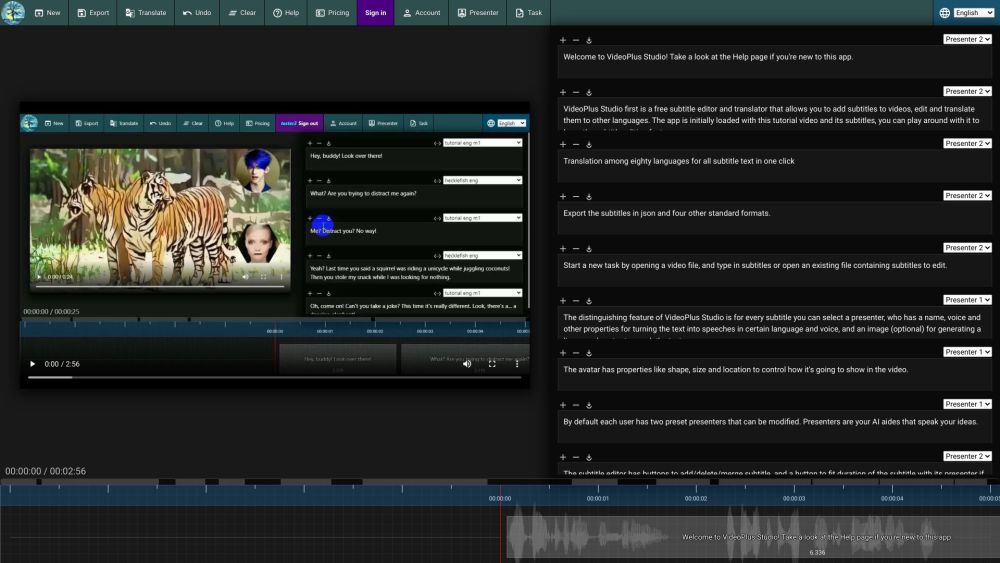
VideoPlus Studio is a free subtitle editor and translator that allows you to add subtitles to videos, edit and translate them to other languages. The distinguishing feature of VideoPlus Studio is that for every subtitle you can select a presenter, who has properties for turning the text into speeches in a certain language and voice, spoken by an avatar of your choice.
Start a new task by opening a video or subtitle file. Save subtitles to a local file. Export subtitles in json and other standard formats. Translate subtitles into another language. Undo the last change or clear all subtitles. View pricing and subscribe to a paid plan. Sign in to view/edit account info. View/Edit presenters. Submit current task to process and view task history.
#1 Create engaging videos with dynamic avatars. #2 Translate subtitles to reach a wider audience. #3 Enhance videos with visually appealing subtitles. #4 Generate lip-synced avatars to speak subtitles.
Free subtitle editor and translator. Add and edit subtitles for videos. Translation among 80 languages in one click. Export subtitles in json and four other standard formats. Select a presenter for each subtitle. Avatars with lip-synced speech based on text. Customizable avatar properties: shape, size, location. Modify preset presenters. Fit subtitle duration with presenter. Play video and see text moving along with the timeline. Submit tasks for processing and view task history.
What languages does VideoPlus Studio support for translation? Can I export the subtitles in json format? How do I add subtitles to a video? Can I modify the properties of the presenters? How can I fit the duration of a subtitle with its presenter? How can I submit a task for processing?
Tools aus denselben Kategorien, sortiert nach gemeinsamen Kategorien und dann nach Gesamtaufrufen. Vergleiche die Funktionen, um eine passende Alternative zu finden.
VidAU AI empowers you to create videos simply through product links or descriptions, with realistic AI avatars as your engaging spokesperson
AI-powered platform for interactive video hosting and marketing.
The most brilliant AI dubbing system
A platform to summarize and save videos from TikTok, Reels, and Shorts
Be a virtual YouTuber with NO expensive devices!
Automatisez la traduction de vos vidéos dans plus de 10 langues avec une voix ultra réaliste et une synchronisation labiale précise.
Weitere Tools nach Gesamtaufrufen auf ToolsBot. Bei gleicher Aufrufzahl erscheinen neuere Einträge zuerst.
Kostenloser Online-Editor für Rückblickvideos: Fotos hinzufügen, Vorlage auswählen und ein auf den Beat abgestimmtes MP4 herunterladen. Kein
Verwandle Fotos direkt in Telegram in Anime, Aquarelle, 3D-Avatare und andere kreative Stile. Erstelle personalisierte Foto-Grußkarten. Neue
Verwandle Produktupdates in kanalreife Marketingtexte und visuelle Inhalte.
Das LinkedIn MCP für KI-Agenten.
KI-Produktfotografie für Kleidungshändler: Erstelle aus Kleidungsfotos Bilder mit Models, Ghost-Mannequin- und Flat-Lay-Bilder oder entferne
AI Photo Detector prüft Fotos auf KI-Generierung und Bearbeitung. Zeigen Sie die Klassifizierung, den Konfidenzwert und gegebenenfalls eine
Produktreferenz: VideoPlus Studio — Produktwebsite.
Prüfe aktuelle Funktionen, Preise und Richtlinien auf der Produktwebsite, bevor du das Tool einsetzt.
ToolsBot hilft bei der Suche und beim Vergleich. Ein Eintrag ist keine Empfehlung oder Garantie für Produktangaben.