VidAU
VidAU AI empowers you to create videos simply through product links or descriptions, with realistic AI avatars as your engaging spokesperson
VideoPlus Studio is a free subtitle editor and translator that allows you to add subtitles to videos, edit and translate them to other languages. The distinguishing feature of VideoPlus Studio is that for every subtitle you can select a presenter, who has properties for turning the text into speeches in a certain language and voice, spoken by an avatar of your choice.
Publicado e mantido por Equipe editorial do ToolsBot
| Site do produto | VideoPlus Studio |
|---|---|
| Categoria |
As datas se referem ao registro no ToolsBot, não ao lançamento do produto nem a uma nova avaliação independente.
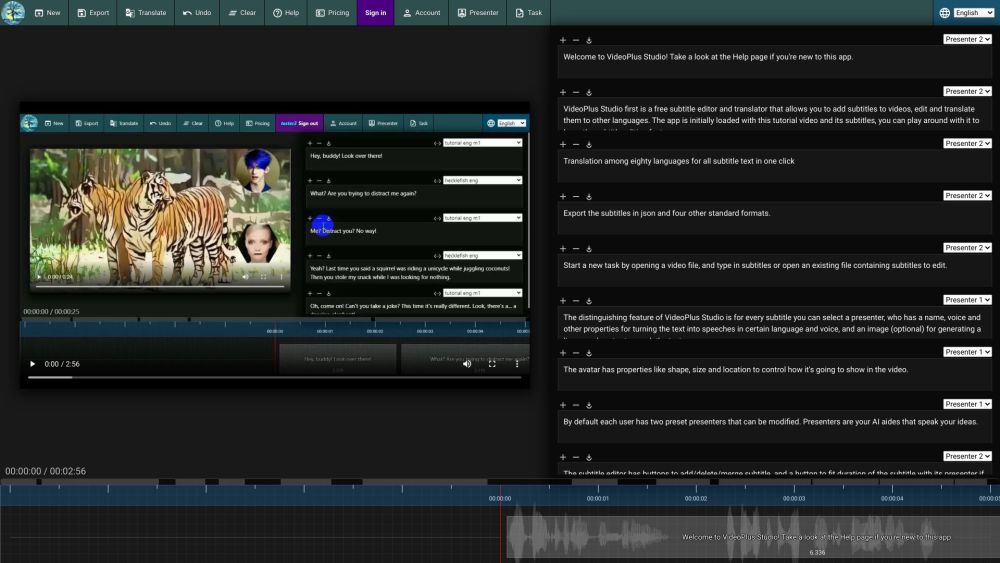
VideoPlus Studio is a free subtitle editor and translator that allows you to add subtitles to videos, edit and translate them to other languages. The distinguishing feature of VideoPlus Studio is that for every subtitle you can select a presenter, who has properties for turning the text into speeches in a certain language and voice, spoken by an avatar of your choice.
Start a new task by opening a video or subtitle file. Save subtitles to a local file. Export subtitles in json and other standard formats. Translate subtitles into another language. Undo the last change or clear all subtitles. View pricing and subscribe to a paid plan. Sign in to view/edit account info. View/Edit presenters. Submit current task to process and view task history.
#1 Create engaging videos with dynamic avatars. #2 Translate subtitles to reach a wider audience. #3 Enhance videos with visually appealing subtitles. #4 Generate lip-synced avatars to speak subtitles.
Free subtitle editor and translator. Add and edit subtitles for videos. Translation among 80 languages in one click. Export subtitles in json and four other standard formats. Select a presenter for each subtitle. Avatars with lip-synced speech based on text. Customizable avatar properties: shape, size, location. Modify preset presenters. Fit subtitle duration with presenter. Play video and see text moving along with the timeline. Submit tasks for processing and view task history.
What languages does VideoPlus Studio support for translation? Can I export the subtitles in json format? How do I add subtitles to a video? Can I modify the properties of the presenters? How can I fit the duration of a subtitle with its presenter? How can I submit a task for processing?
Ferramentas das mesmas categorias, ordenadas por categorias em comum e depois pelo total de visualizações. Compare os recursos para encontrar uma alternativa adequada.
VidAU AI empowers you to create videos simply through product links or descriptions, with realistic AI avatars as your engaging spokesperson
AI-powered platform for interactive video hosting and marketing.
The most brilliant AI dubbing system
A platform to summarize and save videos from TikTok, Reels, and Shorts
Be a virtual YouTuber with NO expensive devices!
Automatisez la traduction de vos vidéos dans plus de 10 langues avec une voix ultra réaliste et une synchronisation labiale précise.
Mais ferramentas ordenadas pelo total de visualizações no ToolsBot. Em caso de empate, os registros mais recentes aparecem primeiro.
Free in-browser Remove AI Label tool that strips EXIF, XMP, IPTC, C2PA and PNG text, plus an optional paid SynthID watermark remover.
Raydo runs AI agents on your desktop across your browser, local files and tools, then hands back reviewable deliverables instead of just ans
SJolt is a unified API for generation models (image, video, editing) with playground-to-production flow and usage-based billing.
A free daily helper for NYT Connections, with hints, answers, and spoiler-safe notes for the day's puzzle.
A free Minecraft enchantment calculator that finds the cheapest anvil combine order so you can apply books without hitting Too Expensive.
Create a 15-second vertical 480p rap clip from photos of consenting adults. Pick one of eight scenes and keep its original soundtrack. Templ
Referência do produto: VideoPlus Studio — Site do produto.
Confira os recursos, preços e políticas atuais no site do produto antes de utilizá-lo.
O ToolsBot fornece informações para descoberta e comparação. Uma listagem não é um endosso nem uma garantia das alegações do produto.