VidAU
VidAU AI empowers you to create videos simply through product links or descriptions, with realistic AI avatars as your engaging spokesperson
VideoPlus Studio is a free subtitle editor and translator that allows you to add subtitles to videos, edit and translate them to other languages. The distinguishing feature of VideoPlus Studio is that for every subtitle you can select a presenter, who has properties for turning the text into speeches in a certain language and voice, spoken by an avatar of your choice.
Publicado y mantenido por Equipo editorial de ToolsBot
| Sitio web del producto | VideoPlus Studio |
|---|---|
| Categoría |
Las fechas corresponden al registro de ToolsBot, no al lanzamiento del producto ni a una nueva evaluación independiente.
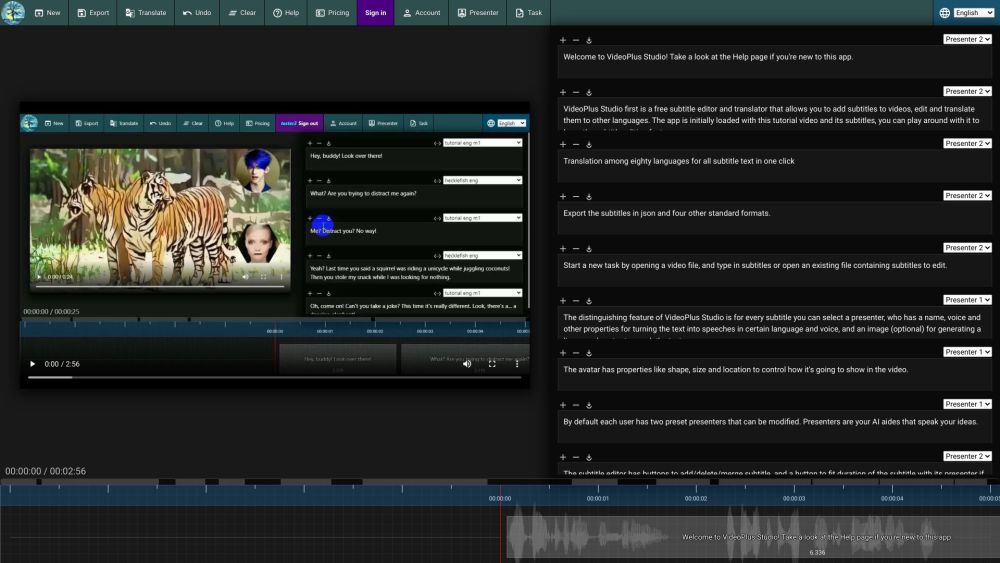
VideoPlus Studio is a free subtitle editor and translator that allows you to add subtitles to videos, edit and translate them to other languages. The distinguishing feature of VideoPlus Studio is that for every subtitle you can select a presenter, who has properties for turning the text into speeches in a certain language and voice, spoken by an avatar of your choice.
Start a new task by opening a video or subtitle file. Save subtitles to a local file. Export subtitles in json and other standard formats. Translate subtitles into another language. Undo the last change or clear all subtitles. View pricing and subscribe to a paid plan. Sign in to view/edit account info. View/Edit presenters. Submit current task to process and view task history.
#1 Create engaging videos with dynamic avatars. #2 Translate subtitles to reach a wider audience. #3 Enhance videos with visually appealing subtitles. #4 Generate lip-synced avatars to speak subtitles.
Free subtitle editor and translator. Add and edit subtitles for videos. Translation among 80 languages in one click. Export subtitles in json and four other standard formats. Select a presenter for each subtitle. Avatars with lip-synced speech based on text. Customizable avatar properties: shape, size, location. Modify preset presenters. Fit subtitle duration with presenter. Play video and see text moving along with the timeline. Submit tasks for processing and view task history.
What languages does VideoPlus Studio support for translation? Can I export the subtitles in json format? How do I add subtitles to a video? Can I modify the properties of the presenters? How can I fit the duration of a subtitle with its presenter? How can I submit a task for processing?
Herramientas de las mismas categorías, ordenadas por categorías compartidas y luego por visitas totales. Compara sus funciones para encontrar una alternativa adecuada.
VidAU AI empowers you to create videos simply through product links or descriptions, with realistic AI avatars as your engaging spokesperson
AI-powered platform for interactive video hosting and marketing.
The most brilliant AI dubbing system
A platform to summarize and save videos from TikTok, Reels, and Shorts
Be a virtual YouTuber with NO expensive devices!
Automatisez la traduction de vos vidéos dans plus de 10 langues avec une voix ultra réaliste et une synchronisation labiale précise.
Más herramientas, ordenadas por visitas totales en ToolsBot. Con las mismas visitas, se muestran primero las publicaciones más recientes.
Creador gratuito de vídeos recopilatorios en línea: añade tus fotos, elige una plantilla y descarga un MP4 sincronizado con el ritmo. Sin ap
Transforma fotos en anime, acuarelas, avatares 3D y otros estilos creativos dentro de Telegram. Crea tarjetas de felicitación personalizadas
Convierte las novedades de producto en textos e imágenes de marketing listos para cada canal.
El MCP de LinkedIn para agentes de IA.
Fotografía de productos con IA para vendedores de ropa: crea imágenes con modelo, maniquí invisible y prendas en plano a partir de fotos de
AI Photo Detector comprueba si las fotos se han generado o editado con IA. Consulta la clasificación, el nivel de confianza y el análisis po
Referencia del producto: VideoPlus Studio — Sitio web del producto.
Consulta las funciones, los precios y las políticas actuales en el sitio del producto antes de utilizarlo.
ToolsBot ofrece información para descubrir y comparar productos. La inclusión no implica respaldo ni garantiza las afirmaciones del producto.