VidAU
VidAU AI empowers you to create videos simply through product links or descriptions, with realistic AI avatars as your engaging spokesperson
VideoPlus Studio is a free subtitle editor and translator that allows you to add subtitles to videos, edit and translate them to other languages. The distinguishing feature of VideoPlus Studio is that for every subtitle you can select a presenter, who has properties for turning the text into speeches in a certain language and voice, spoken by an avatar of your choice.
게시 및 관리: ToolsBot 편집팀
| 제품 웹사이트 | https://videoplus.studio/ |
|---|---|
| 범주 |
날짜는 ToolsBot 등록 기록에 관한 것으로, 제품 출시일이나 새로운 독립 평가일을 의미하지 않습니다.
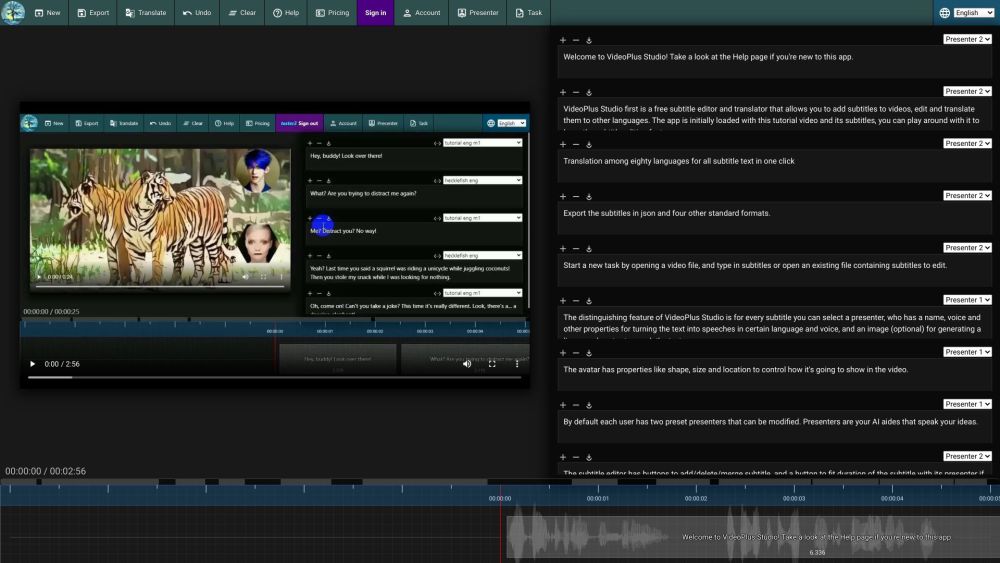
VideoPlus Studio is a free subtitle editor and translator that allows you to add subtitles to videos, edit and translate them to other languages. The distinguishing feature of VideoPlus Studio is that for every subtitle you can select a presenter, who has properties for turning the text into speeches in a certain language and voice, spoken by an avatar of your choice.
Start a new task by opening a video or subtitle file. Save subtitles to a local file. Export subtitles in json and other standard formats. Translate subtitles into another language. Undo the last change or clear all subtitles. View pricing and subscribe to a paid plan. Sign in to view/edit account info. View/Edit presenters. Submit current task to process and view task history.
#1 Create engaging videos with dynamic avatars. #2 Translate subtitles to reach a wider audience. #3 Enhance videos with visually appealing subtitles. #4 Generate lip-synced avatars to speak subtitles.
Free subtitle editor and translator. Add and edit subtitles for videos. Translation among 80 languages in one click. Export subtitles in json and four other standard formats. Select a presenter for each subtitle. Avatars with lip-synced speech based on text. Customizable avatar properties: shape, size, location. Modify preset presenters. Fit subtitle duration with presenter. Play video and see text moving along with the timeline. Submit tasks for processing and view task history.
What languages does VideoPlus Studio support for translation? Can I export the subtitles in json format? How do I add subtitles to a video? Can I modify the properties of the presenters? How can I fit the duration of a subtitle with its presenter? How can I submit a task for processing?
같은 카테고리의 도구를 공통 카테고리 수, 누적 조회수 순으로 표시합니다. 기능을 비교하여 적합한 대안을 찾아보세요.
VidAU AI empowers you to create videos simply through product links or descriptions, with realistic AI avatars as your engaging spokesperson
AI-powered platform for interactive video hosting and marketing.
The most brilliant AI dubbing system
A platform to summarize and save videos from TikTok, Reels, and Shorts
Be a virtual YouTuber with NO expensive devices!
Automatisez la traduction de vos vidéos dans plus de 10 langues avec une voix ultra réaliste et une synchronisation labiale précise.
ToolsBot 누적 조회수순으로 정렬한 다른 도구입니다. 조회수가 같으면 최근 등록된 도구를 먼저 표시합니다.
RapVideo AI turns one or two photos into an AI rap video, including the viral Hotel Lobby trend. It writes the lyrics, makes the beat, gener
AI video generation turning text and images into videos and animations for creators.
Online AI face swap for videos and photos, fast and free to try.
All-in-one AI image and video generator using many top models in one place.
输入一段文字描述或上传草图,即可在几分钟内生成符合制图规范的专业平面图,无需 CAD 基础。
Capafy AI is a browser-based AI video generator. Add up to 9 photos or write a prompt, pick one of 5 models (Seedance 2.5, Seedance 2.0, Kli
제품 참고 링크: VideoPlus Studio — 제품 웹사이트.
도입 전에 제품 웹사이트에서 최신 기능, 가격 및 정책을 확인하세요.
ToolsBot은 제품 탐색과 비교를 위한 정보를 제공합니다. 등록이 제품에 대한 보증이나 주장의 정확성을 보장하지는 않습니다.