Artypa
AI-powered platform enhancing creativity for individuals and brands.
First AI tool to generate your own custom fonts and download them in installable format on Mac and Windows
게시 및 관리: ToolsBot 편집팀
| 제품 웹사이트 | Creative Fabrica |
|---|---|
| 범주 |
날짜는 ToolsBot 등록 기록에 관한 것으로, 제품 출시일이나 새로운 독립 평가일을 의미하지 않습니다.
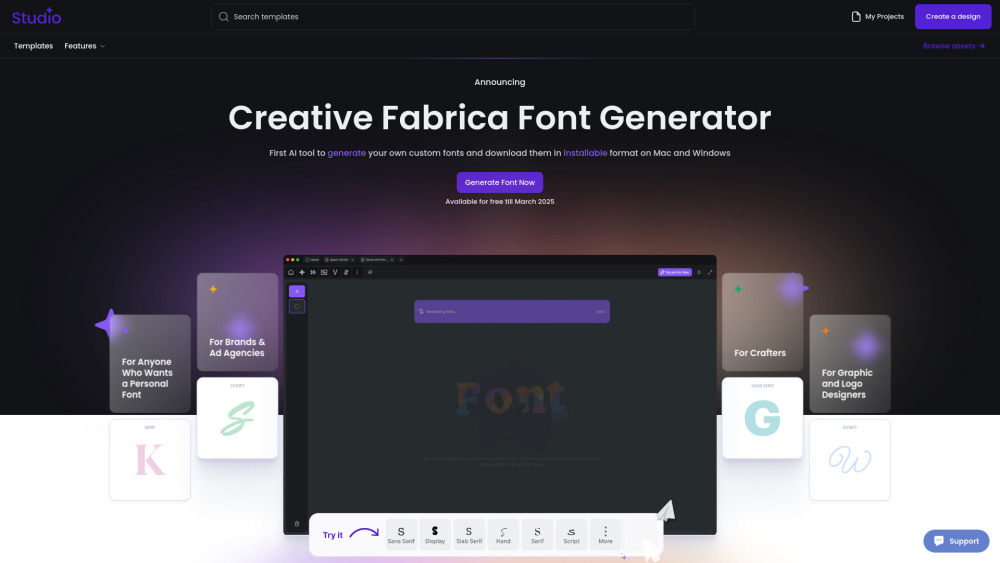
"Not another tool. Another world. Another Future. Our AI Font Generator uses generative AI to create brand-new fonts that you can download and install, making it a game-changer in font creation. We believe that making font design more open and accessible brings new energy to modern creativity. This way, anyone can customize and adapt our fonts to fit their unique ideas and needs."
How to Use Creative Fabrica Font Generator: 1.Go to the website – Open Creative Fabrica Font Generator. 2.Enter your text – Type in the word or phrase you want to style. 3.Choose a font – Browse through the automatically generated styles. 4.Customize if needed – Adjust bold, italic, or size if available. 5.Copy & paste – Click on your favorite style to copy and use it anywhere. 6.Explore more – Click "Load more" for additional styles. Perfect for social media, designs, and creative text!
Creative Fabrica Company name: Creative Fabrica .
Here is the Creative Fabrica support email for customer service: [email protected] . More Contact, visit the contact us page(https://www.creativefabrica.com/contact)
Creative Fabrica Login Link: https://www.creativefabrica.com/login
같은 카테고리의 도구를 공통 카테고리 수, 누적 조회수 순으로 표시합니다. 기능을 비교하여 적합한 대안을 찾아보세요.
AI-powered platform enhancing creativity for individuals and brands.
AI platform for training models and generating custom images.
AI platform for creating magical experiences from selfies.
Convert rough sketches to photorealistic images with AI.
AI image generator for creating stunning visuals and designs.
Community platform for sharing MidJourney prompts and SREF codes.
ToolsBot 누적 조회수순으로 정렬한 다른 도구입니다. 조회수가 같으면 최근 등록된 도구를 먼저 표시합니다.
건물, 인테리어 및 풍경을 위한 GetRender의 AI 건축 렌더링 도구를 스케치에서 렌더링까지 디자인 프레젠테이션까지 탐색하십시오.
FloatSong의 AI 음악 생성기를 사용하여 텍스트 또는 가사에서 노래를 생성합니다.Suno 또는 Flow Music을 선택하고 가사를 작성하고 하나의 스튜디오
AI 스프라이트 애니메이션 생성기 및 게임을위한 스프라이트 시트 메이커.생산 준비된 스프라이트 시트, 워킹 사이클 및 JSON 애틀라스를 몇 분 만에
MemoTune는 웹 기반 AI 노래 생성기입니다.아이디어, 가사, 이야기 및 이미지를 보컬 또는 악기로 완전한 노래로 변환하십시오.음악 능력이 필요하지
MP3를 업로드하거나 노래 링크를 SongSongSongScene가 비트 동기화 된 절단, 가사 캐پ션 및 9:16, 16:9 또는 1:1 내보내기를 가진 스마트 AI 음악 비
하나의 AI 크리에이티브 스튜디오에서 이미지, 비디오 클립 및 음악을 만들어보세요.모델을 선택하고 텍스트 또는 이미지로 시작하고 생성하기 전에
제품 참고 링크: Creative Fabrica — 제품 웹사이트.
도입 전에 제품 웹사이트에서 최신 기능, 가격 및 정책을 확인하세요.
ToolsBot은 제품 탐색과 비교를 위한 정보를 제공합니다. 등록이 제품에 대한 보증이나 주장의 정확성을 보장하지는 않습니다.